Datasource Environment Variables
Overview
The Connection Property configuration extends the existing connection management model (such as JDBC, REST, JMS, File, etc.) by introducing a lightweight environment-aware key--value configuration mechanism.
Unlike traditional datasource configurations, Connection Properties are designed specifically to:
- Store environment-scoped values
- Allow runtime retrieval inside services
- Support deployment-specific overrides without modifying service logic
This approach provides a structured and deployment-friendly way to manage configurable values across multiple environments.
Configuration Structure
The Connection Property configuration contains three primary inputs.
datasourceName
The datasourceName acts as the logical identifier of the property.
It functions as the key used to:
- Store the value for a specific environment
- Retrieve the value inside services
Value
The Value represents the actual value assigned to the
datasourceName.
This value is environment-specific and can vary between deployments (for example: DEV, QA, or PROD environments).
Environment
The Environment specifies the target environment where the property should apply.
Each environment can define a different value for the same datasourceName.
Purpose and Design Rationale
This configuration was introduced for two primary reasons.
Environment-Based Value Management
Connection Properties allow values to change depending on the deployment environment without modifying application code.
Example Use Cases
- Environment-specific URLs
- Feature toggles
- External service identifiers
- Credential references
- Configuration flags
This enables controlled configuration management during deployment.
Runtime Access Inside Services
Unlike other datasource configurations such as JDBC, REST, JMS, or File, Connection Property values can be accessed directly inside services.
This capability was not available in the existing datasource configuration model.
This enables:
- Dynamic service behavior based on environment
- Centralized configuration management
- Reduced hardcoded values in services
Where Environment Keys Are Stored
Environment keys are defined in the following configuration file:
application-{environment}.yaml
Under the section:
Environment-Variables:
These keys:
- Are visible on the Deployment page
- Are resolved during deployment
- Are accessible inside services
Accessing Environment Variables in Services
Environment variables can be accessed inside services using the following syntax:
$Environment-Varaibles.key
Replace key with the configured environment variable name.
Example
$Environment-Varaibles.accesskey
For implementation reference, review service usage examples in the TRREST_CNREST project.
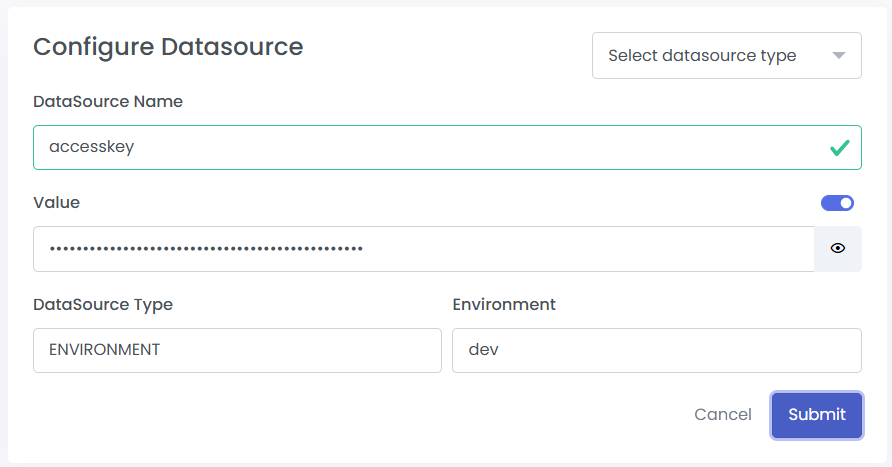
Creating a Connection Property
Follow these steps to create a Connection Property:
- Navigate to Connection Property Configuration
- Provide the following inputs:
datasourceNameValueEnvironment
- Save the configuration
Using the Connection Property in a Service
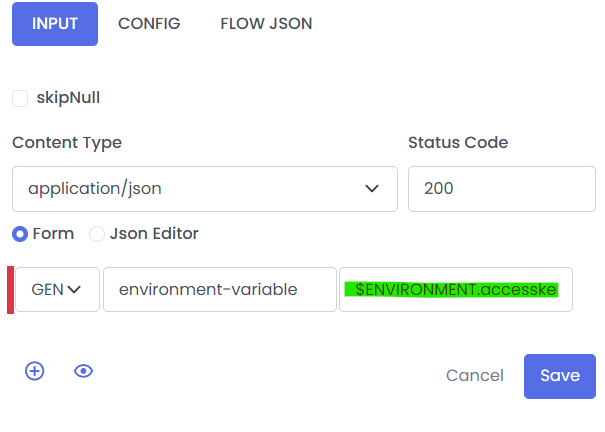
Once the property is created, it can be referenced inside a service using:
$Environment-Varaibles.key
Example
If the following property is created:
datasourceName: accesskey Value: 12345XYZ Environment: DEV
It can be accessed inside the service as:
$Environment-Varaibles.accesskey
In the TRREST_CNREST project, the service environmentVariable demonstrates this usage.
In that example:
- A connection property with key accesskey is created.
- The service retrieves the value using the environment variable syntax.
- The retrieved value is returned in the API response step.
Key Differences from Other Datasource Types
Feature JDBC / REST / JMS / File Connection Property
Environment-specific values Limited Yes Runtime service access No Yes Designed for configuration flags No Yes Deployment-time override Limited Yes
Summary
The Connection Property configuration provides:
- Environment-scoped key--value storage
- Deployment-level configurability
- Runtime service accessibility
- Clear separation between configuration and service logic
This improves flexibility while maintaining structured configuration management across environments.